
brograming
[Collection] Map 본문
Map
ㆍ키와 값을 함께 저장
ㆍ값의 순서가 없다.
ㆍ방번호로 접근하지 않고 키값으로 검색
ㆍ빠른 검색 지원
ㆍ순서 x, 중복(키x, 값 o)
생성 : HashMap<Integer, String> map = new HashMap<>();
추가 : map.put(키, 값);
검색 : map.get(키);
키 묶음 : map.keySet();
값 묶음 : map.values();
같은 key가 있을 때 value를 덮어 씀 : map1.putAll(map 2);
Iterator사용
map.keySet().iterator(); // 키 집합에서 키를 하나씩 꺼냄
map.values().iterator(); // 값 묶음에서 값을 하나씩 꺼냄
public class MapTest {

    public static void main(String[] args) {

        // 맵 생성. 키 타입은 int, 값 타입은 String
        // 키는 검색의 기준이기 때문에 중복허용 안함
        //      ___키___ ___값___
        HashMap<Integer, String> map = new HashMap<>();

        //map.put(키, 값) : 맵에 데이터 추가
        map.put(1, "aaa");
        map.put(2, "bbb");
        map.put(3, "ccc");

        //map.get(키) : 키로 검색하여 값 반환
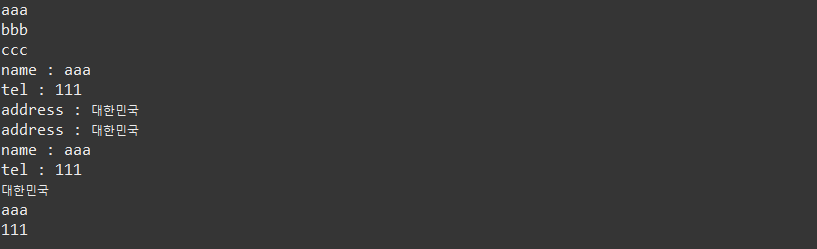
        System.out.println(map.get(1));
        System.out.println(map.get(2));
        System.out.println(map.get(3));

        HashMap<String, String> map2 = new HashMap<>();

        map2.put("name", "aaa");
        map2.put("tel", "111");
        map2.put("address", "대한민국");

        System.out.println("name : " + map2.get("name"));
        System.out.println("tel : " + map2.get("tel"));
        System.out.println("address : " + map2.get("address"));

        for(String key : map2.keySet()) {  //keySet() : 키 묶음
            System.out.print(key + " : ");
            System.out.println(map2.get(key)); // 키로 값 추출
        }

        for(String s : map2.values()) {  // values() : 값 묶음
            System.out.println(s);       // 값만 추출
        }
    }
'[JAVA]' 카테고리의 다른 글
| 자바 jdk-17 설치 및 환경변수 설정 (0) | 2023.07.25 |
|---|---|
| char 배열을 문자열로 변환 String.valueOf() / new String() (0) | 2023.04.17 |
| [입출력] 바이트 기반 스트림 (0) | 2023.04.17 |
| [입출력] 문자 기반 스트림 (0) | 2023.04.17 |
| [Collection] ArrayList (0) | 2023.04.16 |