
brograming
테이블 테두리 본문
■html 테두리 border
<!DOCTYPE html>
<html>
<head>
<meta charset="EUC-KR">
<title>Insert title here</title>


</head>
<body>
<h3>방명록</h3>
<form name = "f">
👉<table id = "t1" border = '1'>
<tr><th>작성자</th><td> <input type = "text" name = "writer" id="writer"><br/></td></tr>
<tr><th>글 비밀번호</th><td><input type = "password" name = "pwd" id = "pwd"><br/></td></tr>
<tr><th>내용</th><td><input type = "text" name = "content" id = "content"><br/></td></tr>
<tr><th>작성</th><td><input type = "submit" value = "작성" onclick = "a()"></td></tr>
</table>
</form>
</body>
</html>
■css 테두리 border
id가 t1인 table요소에 테두리 설정
<style type="text/css">
#t1{
border : 1px solid black;
}
</style>
<!DOCTYPE html>
<html>
<head>
<meta charset="EUC-KR">
<title>Insert title here</title>
<style type="text/css">
#t1{
👉border : 1px solid black;
}
</style>

</head>
<body>
<h3>방명록</h3>
<form name = "f">
<table id = "t1">
<tr><th>작성자</th><td> <input type = "text" name = "writer" id="writer"><br/></td></tr>
<tr><th>글 비밀번호</th><td><input type = "password" name = "pwd" id = "pwd"><br/></td></tr>
<tr><th>내용</th><td><input type = "text" name = "content" id = "content"><br/></td></tr>
<tr><th>작성</th><td><input type = "submit" value = "작성" onclick = "a()"></td></tr>
</table>
</form>
</body>
</html>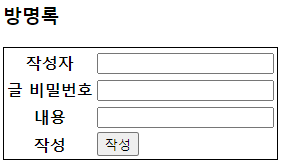
th, td 요소에 테두리 설정
<style type="text/css">
th, td {
border : 1px solid #444444;
}
</style>
<!DOCTYPE html>
<html>
<head>
<meta charset="EUC-KR">
<title>Insert title here</title>
<style type="text/css">
#t1{
border : 1px solid black;
}

👉th, td{
border: 1px solid #444444;
}
</style>

</head>
<body>
<h3>방명록</h3>
<form name = "f">
<table id = "t1">
<tr><th>작성자</th><td> <input type = "text" name = "writer" id="writer"><br/></td></tr>
<tr><th>글 비밀번호</th><td><input type = "password" name = "pwd" id = "pwd"><br/></td></tr>
<tr><th>내용</th><td><input type = "text" name = "content" id = "content"><br/></td></tr>
<tr><th>작성</th><td><input type = "submit" value = "작성" onclick = "a()"></td></tr>
</table>
</form>
</body>
</html>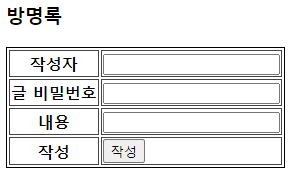
테두리 사이의 간격제거 : border-collapse
#t1{
border : 1px solid black;
border-collapse : collapse;
}
<!DOCTYPE html>
<html>
<head>
<meta charset="EUC-KR">
<title>Insert title here</title>
<style type="text/css">
#t1{
border : 1px solid black;
👉border-collapse : collapse;
}

th, td{
border: 1px solid #444444;
}
</style>

</head>
<body>
<h3>방명록</h3>
<form name = "f">
<table id = "t1">
<tr><th>작성자</th><td> <input type = "text" name = "writer" id="writer"><br/></td></tr>
<tr><th>글 비밀번호</th><td><input type = "password" name = "pwd" id = "pwd"><br/></td></tr>
<tr><th>내용</th><td><input type = "text" name = "content" id = "content"><br/></td></tr>
<tr><th>작성</th><td><input type = "submit" value = "작성" onclick = "a()"></td></tr>
</table>
</form>
</body>
</html>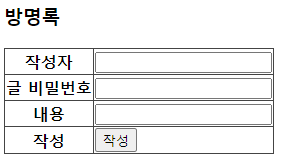
테두리와 내용 사이의 간격 : padding
th, td{
border: 1px solid #444444;
padding : 5px;
}
<!DOCTYPE html>
<html>
<head>
<meta charset="EUC-KR">
<title>Insert title here</title>
<style type="text/css">
#t1{
border : 1px solid black;
border-collapse : collapse;
}

th, td{
border: 1px solid #444444;
👉padding : 5px;
}
</style>

</head>
<body>
<h3>방명록</h3>
<form name = "f">
<table id = "t1">
<tr><th>작성자</th><td> <input type = "text" name = "writer" id="writer"><br/></td></tr>
<tr><th>글 비밀번호</th><td><input type = "password" name = "pwd" id = "pwd"><br/></td></tr>
<tr><th>내용</th><td><input type = "text" name = "content" id = "content"><br/></td></tr>
<tr><th>작성</th><td><input type = "submit" value = "작성" onclick = "a()"></td></tr>
</table>
</form>
</body>
</html>
가로선만 있는 테두리
<style type="text/css">
#t1{
border-top: 1px solid black;
border-collapse : collapse;
}
th, td{
border-bottom: 1px solid #444444;
padding : 5px;
}
</style>
<!DOCTYPE html>
<html>
<head>
<meta charset="EUC-KR">
<title>Insert title here</title>
<style type="text/css">
#t1{
👉border-top: 1px solid black;
border-collapse : collapse;
}

th, td{
👉border-bottom: 1px solid #444444;
padding : 5px;
}
</style>

</head>
<body>
<h3>방명록</h3>
<form name = "f">
<table id = "t1">
<tr><th>작성자</th><td> <input type = "text" name = "writer" id="writer"><br/></td></tr>
<tr><th>글 비밀번호</th><td><input type = "password" name = "pwd" id = "pwd"><br/></td></tr>
<tr><th>내용</th><td><input type = "text" name = "content" id = "content"><br/></td></tr>
<tr><th>작성</th><td><input type = "submit" value = "작성" onclick = "a()"></td></tr>
</table>
</form>
</body>
</html>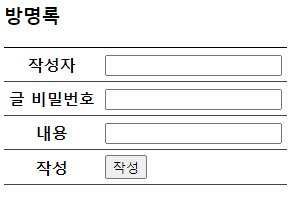
양 끝에만 선이 없는 테두리
th, td{
border-bottom: 1px solid #444444;
border-left: 1px solid #444444;
padding : 5px;
}
th:first-child {
border-left: none;
}
<!DOCTYPE html>
<html>
<head>
<meta charset="EUC-KR">
<title>Insert title here</title>
<style type="text/css">
#t1{
border-top: 1px solid black;
border-collapse : collapse;
}

th, td{
border-bottom: 1px solid #444444;
👉border-left: 1px solid #444444;
padding : 5px;
}
👉th:first-child {
    border-left: none;
  }
</style>

</head>
<body>
<h3>방명록</h3>
<form name = "f">
<table id = "t1">
<tr><th>작성자</th><td> <input type = "text" name = "writer" id="writer"><br/></td></tr>
<tr><th>글 비밀번호</th><td><input type = "password" name = "pwd" id = "pwd"><br/></td></tr>
<tr><th>내용</th><td><input type = "text" name = "content" id = "content"><br/></td></tr>
<tr><th>작성</th><td><input type = "submit" value = "작성" onclick = "a()"></td></tr>
</table>
</form>
</body>
</html>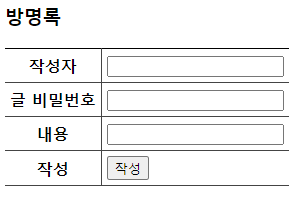
※ 빈 셀에 테두리를 만들고 싶지 않다면 empty-cells 속성을 이용하면 된다.
'[HTML, CSS]' 카테고리의 다른 글
| 테이블 <table> (0) | 2023.03.22 |
|---|
