
brograming
event handler 본문
event : 마우스나 키보드를 조작하여 기능을 실행하는 행위
handler : 하나의 요소에 하나의 이벤트 처리 가능. HTML 태그에 설정하거나, DOM 요소 객체의 이벤트 처리기 프로퍼티 설정하는 방법
주요 이벤트 처리기
click : 클릭 이벤트. onclick
load : 페이지 열리자마자 발생. onload
focus : 포커스 획득. onfocus
blur : 포커스 빼앗김. onblur
change : 입력값이 변경된 뒤 포커스 잃었을 때. onchange
mouseover : 영역에 마우스가 들어갔을 때. onmouseover
mouseout : 영역에 마우스가 나갔을 때. onmouseout
keydown : 키보드 누를 때. onkeydown
keyup : 키보드 눌렀다 땠을 때. onkeyup
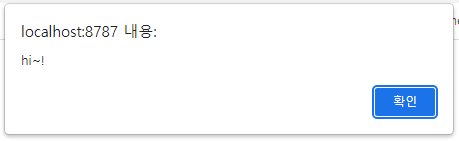
load : HTML을 모두 읽어 들였을 때
<script type = "text/javascript">
window.onload = function(){
alert("hi~!")
}
</script>
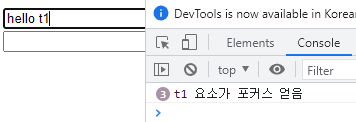
focus : input 요소가 포커스를 얻었을 때
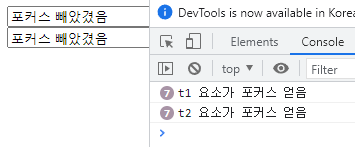
blur : input 요소가 포커스를 잃었을 때
<!DOCTYPE html>
<html>
<head>
<meta charset="EUC-KR">
<title>Insert title here</title>
<script type = "text/javascript">
function a(tt, str){
	console.log(str + " 요소가 포커스 얻음");
	tt.value = "hello " + str;
}
function b(tt){
	tt.value = "포커스 빼았겼음";
}
</script>
</head>
<body>

<form name = "f">
<input type = "text" name = "t1" onfocus="a(this,'t1')" onblur = "b(this)"><br/>
<input type = "text" name = "t2" onfocus="a(this,'t2')" onblur = "b(this)"><br/>
</form>
</body>
</html>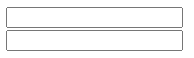

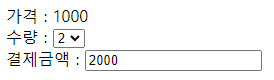
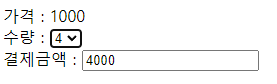
change : input 요소의 값이 바뀌었을 때
<!DOCTYPE html>
<html>
<head>
<meta charset="EUC-KR">
<title>Insert title here</title>
<script type = "text/javascript">

function c(){
	f.total.value = 1000*f.sel.value;
}
</script>
</head>
<body>

<form name = "f">

가격 : 1000<br/>
수량 : <select name = "sel" onchange="c()">
<option value = "1" selected>1</option>
<option value = "2" >2</option>
<option value = "3" >3</option>
<option value = "4" >4</option>
</select><br/>
결제금액 : <input type = "text" name = "total" value = "0">

</form>
</body>
</html>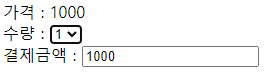
onmouseover : 영역에 마우스가 들어갔을 때
onmouseout : 영역에 마우스가 나갔을 때
<!DOCTYPE html>
<html>
<head>
<meta charset="EUC-KR">
<title>Insert title here</title>
<script type = "text/javascript">

function f1(){
	let div = document.getElementById("mydiv");
	console.log("in")
	div.style.backgroundColor = 'yellow';
}
function f2(){
	let div = document.getElementById("mydiv");
	div.style.backgroundColor = 'skyblue';
}
</script>
</head>
<body>
<form name = "f">

<div id = "mydiv" style = "width:150px; height:150px; border:2px solid red"
onmouseover = "f1()" onmouseout = "f2()"></div>
</form>
</body>
</html>

keyup : 키보드 눌렀다 뗐을 때
<!DOCTYPE html>
<html>
<head>
<meta charset="EUC-KR">
<title>Insert title here</title>
<script type = "text/javascript">

function f3(){
	let len = 10-f.keytest.value.length;
	let div = document.getElementById("ddd");
	div.innerHTML = len;
}
</script>
</head>
<body>

<form name = "f">

10글자 까지만 입력<div id = "ddd">10</div>
<input type = "text" name = "keytest" onkeyup = "f3()">
</form>
</body>
</html>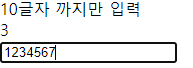
'[JAVASCRIPT]' 카테고리의 다른 글
| JSON.parse() (0) | 2023.04.18 |
|---|---|
| 버튼 추가, 제거 (getElementById, appendChild) (0) | 2023.03.25 |
| alert 알림창(경고창) 띄우기 (0) | 2023.03.22 |
| var, let, const (0) | 2023.03.22 |

