
brograming
[JAVASCRIPT]_Day25 본문
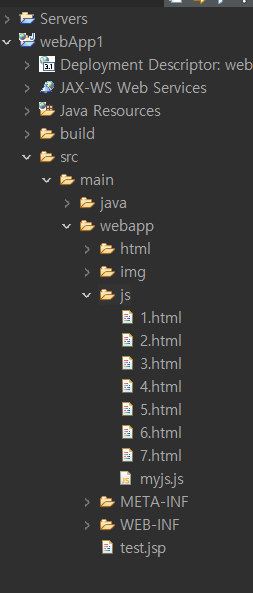
<script> 1.html, myjs
script 태그는 <head> 나 <body>에 작성해도 괜찮다.
</script>
변수 : 선언 해도 되고 안해도 됨
var 변수명; // var : 블럭 밖에 선언 / 안에 선언한 차이 없음 / 중복 선언 가능. 재할당 가능
let 변수명;
var a = 10; // var : 블럭 밖에 선언 / 안에 선언한 차이 없음
let b = 20; // let : 블럭 안에서 선언하면 블럭 내에서만 사용 가능
let g = {"name" : "aaa", "tel" : "111"}; // json : 데이터를 표현하는 기법
<타입종류>
var a = 10; // 정수
let b = 20; // 정수
c = "hello"; // 문자열
d = 'abc'; // 문자열
let e = 2.34; // 실수
let f = [1,2,3,4,5]; // 배열
let g = {"name" : "aaa", "tel" : "111"}; // 객체
let h = true; // boolean
<연산자>
+, -, *, /, %
++, --
&&, ||
==, !=, >, >=, <, <=
=, +=, -=, *=, /=, %=
<제어문>
ㆍif(조건){
실행문;
}else{
실행문;
}
ㆍif(조건1){
실행문;
}else if(조건2){
실행문;
} else {
실행문;
}
ㆍswitch(변수){
case 1:
break;
case 2:
break;
default :
break;
}
ㆍfor(i = 0; i < 5; i++){
실행문;
}
ㆍwhile(조건){
실행문;
}
ㆍdo{
실행문;
} while(조건);
ㆍcontinue : 루프 진행
ㆍbreak : 루프나 블럭 빠져나감
ㆍreturn : 함수 종료 및 값 반환
▼1.html
|
1
2
3
4
5
6
7
8
9
10
11
12
13
14
15
16
17
18
19
20
21
22
23
24
25
26
27
28
29
30
31
32
33
34
35
36
37
38
39
40
41
42
43
|
<!DOCTYPE html>
<html>
<head>
<meta charset="EUC-KR">
<title>Insert title here</title>
<script type="text/javascript" src = "myjs.js">
// // 전역변수. 함수 밖에서 선언한 변수. 어느 함수에서나 사용 가능
// var a = 10;
// let b = 20;
// c = "hello"; // 문자열은 "",''로 아무거나 사용해도 된다
// d = 'abc'; // 타입 선언없이 바로 사용 가능하다. 할당한 값의 타입이 바로 타입적용됨
</script>
</head>
<body>
<script type="text/javascript">
// html 문서에 출력 메서드
document.write("<h1>a : " + a + " / b : " + b + "</h1>");
document.write("<h1>c : " + c +"</h1>");
document.write("<h1>d : " + d +"</h1>");
document.write("<h1>d : " + d +"</h1>");
document.write("<h1>");
for(i = 0; i < length; i++){
document.write(f[i] + ", ");
}
document.write("</h1>");
document.write("<h1> name : " + g.name + " / tel : " + g.tel + "</h1>");
document.write("<h1>h : " + h +"</h1>");
if(h == true){
document.write("true");
}else{
document.write("false");
}
</script>
</body>
</html>
|
cs |
▼myjs
|
1
2
3
4
5
6
7
8
9
10
11
12
13
|
/**
*
*/
// 전역변수. 함수 밖에서 선언한 변수. 어느 함수에서나 사용 가능
var a = 10;
let b = 20;
c = "hello"; // 문자열은 "",''로 아무거나 사용해도 된다
d = 'abc'; // 타입 선언없이 바로 사용 가능하다
let e = 2.34;
let f = [1,2,3,4,5]; // [배열]
let g = {"name" : "aaa", "tel" : "111"}; // {객체} name, tel 멩버변수 이름. aaa, 111 멤버변수의 값 / g.name g.tel
let h = true; // boolean 타입
dan = 3;
|
cs |
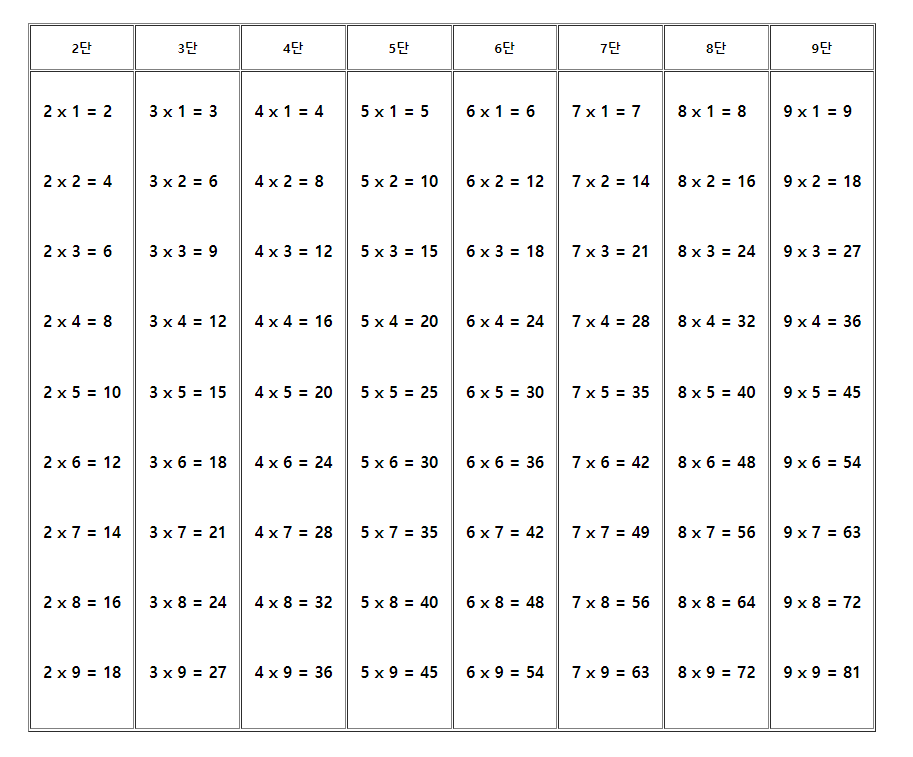
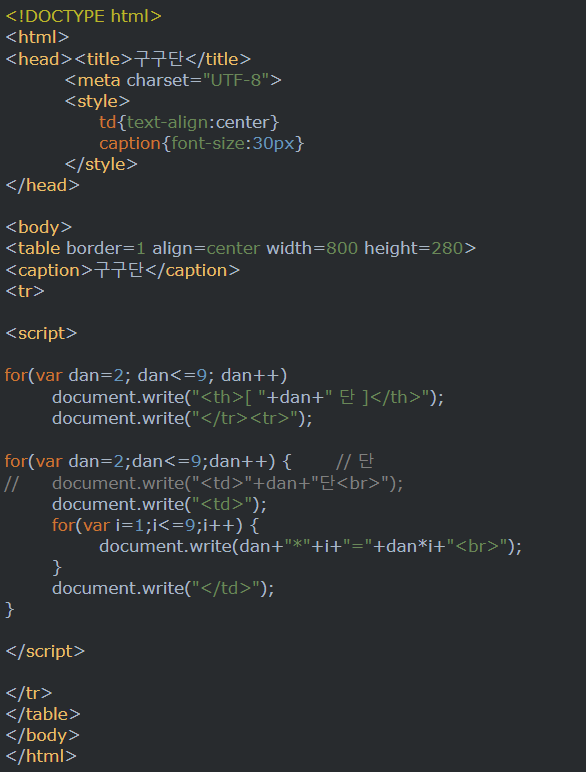
<표에 구구단 만들기>
▼2.html
|
1
2
3
4
5
6
7
8
9
10
11
12
13
14
15
16
17
18
19
20
21
22
23
24
25
26
27
28
29
30
31
32
|
<!DOCTYPE html>
<html>
<head>
<meta charset="EUC-KR">
<title>Insert title here</title>
</head>
<body>
<script type="text/javascript">
// 구구단 표로 만들기
//1행(단 이름)
document.write("<table border = 1 align = center cellpadding = 15>");
document.write("<tr>")
for( dan = 2; dan < 10; dan++){
document.write("<th>" + dan + "단</th>")
}
document.write("</tr>")
// 2행(구구단)
document.write("<tr>")
for ( j = 2; j < 10; j++){
document.write("<td>")
for( i = 1; i < 10; i++){
document.write("<h3>" + j + " x " + i + " = " + j*i + "</h3><br>");
}
document.write("</td>")
}document.write("/<tr>")
document.write("</table>");
</script>
</body>
</html>
|
cs |
<함수> 3.html
1. 함수정의
function 함수명 (파라미터 목록){
실행문;
return 값;
}
2. 함수호출
함수명();
▼3.html
|
1
2
3
4
5
6
7
8
9
10
11
12
13
14
15
16
17
18
19
20
21
22
23
24
25
26
27
28
29
30
31
32
33
34
|
<!DOCTYPE html>
<html>
<head>
<meta charset="EUC-KR">
<title>Insert title here</title>
<script type="text/javascript">
//함수 정의. 함수명 : add. 파라미터 : a, b 2개.
function add(a, b) {
return a + b;
}
// 구구단 단을 입력받아 출력하기
function gugudan(a) {
for (i = 1; i < 10; i++) {
document.write(a + " x " + i + " = " + (a * i) + "<br/>");
}
}
</script>
</head>
<body>
<script type="text/javascript">
let res = add(1, 2);
document.write("res : " + res + "<br/>");
let res2 = add("aaa", "bbb");
document.write("res : " + res2 + "<br/>");
gugudan(3);
</script>
</body>
</html>
|
cs |
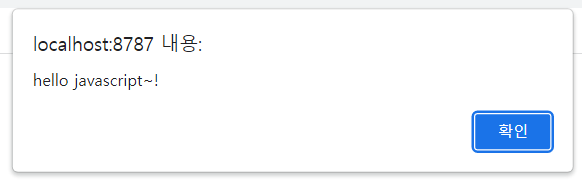
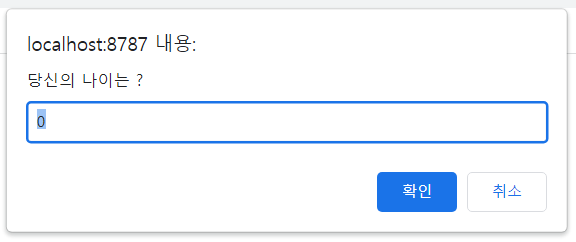
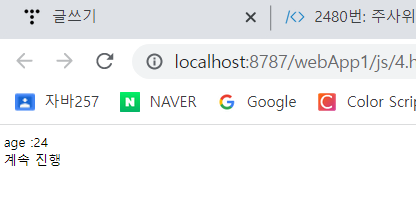
<알림창> 4.html
alert("메세지"); // 메세지와 확인버튼 하나로 구성
let val = prompt("메세지", "초기값"); // 입력박스가 있는 알림창. 입력값 반환
let flag = confirm("메세지"); // 메세지와 확인, 취소 버튼으로 구성. 확인 누르면 true, 취소 누르면 false반환
▼4.html
|
1
2
3
4
5
6
7
8
9
10
11
12
13
14
15
16
17
18
19
20
21
22
|
<!DOCTYPE html>
<html>
<head>
<meta charset="EUC-KR">
<title>Insert title here</title>
</head>
<body>
<script type="text/javascript">
alert("hello javascript~!");
let age = prompt("당신의 나이는 ?", "0"); // 입력값을 반환하기에 age변수에 담음
document.write("age :" + age + "<br/>");
let flag = confirm("계속 할거냐?"); //확인 취소 버튼 두개 보여줌. 확인 :true, 취소 : false
if(flag == true){
document.write("계속 진행");
}else{
document.write("stop");
}
</script>
</body>
</html>
|
cs |

<페이지 이동> 5.html
location href = "이동할 페이지";
<이벤트 핸들러> 5.html
이벤트 :ui에 발생한 사건. 클릭, 드래그, 페이지로드, 입력값변경... , 뷰 페이지에서 발생하는 사건
이벤트 핸들러 : 이벤트가 발생했을 때 자동으로 호출되는 함수
핸들러 등록 속성 : on 이벤트명
<input type = "button" value = "b1" onclick = "함수명('aaa')"> //버튼은 만들고 클릭 시 함수실행
load 이벤트 핸들러 정의
function test(){ ... }
window.onload = test;
>> 위 2줄을 한번에 작성 >window.onload = function( ){ ... }; // 페이지가 시작될때 한번만 실행, 익명함수
<form name = "f">
<input type = "text" name = "t1">
</form>
> 이름이 t1인 입력 양식의 값 : f.t1.value
▼5.html
|
1
2
3
4
5
6
7
8
9
10
11
12
13
14
15
16
17
18
19
20
21
22
23
24
25
26
27
28
29
30
31
32
33
34
35
36
37
38
39
40
|
<!DOCTYPE html>
<html>
<head>
<meta charset="EUC-KR">
<title>Insert title here</title>
<script type="text/javascript">
function a (path){
location.href = path; // 파라미터로 받은 페이지로 이동
}
function b(){
alert(f.btn1.value);
}
function c(){
alert("function c");
}
function d(){
alert("function d");
}
function e(){
f.val.value = "hello";
}
function qq(){
alert(f.val.value)
}
</script>
</head>
<body>
<form name = "f">
<input type = "button" value = "1페이지로 이동" onclick = "a('1.html')">
<input type = "button" value = "2페이지로 이동" onclick = "a('2.html')"><br/>
<input type = "button" name = "btn1" value = "btn1" onclick = "b()">
<input type = "button" value = "btn2" onclick = "c()">
<input type = "button" value = "btn3" onclick = "d()"><br/>
<input type = "text" name = "val">
<input type = "button" value = "확인" onclick = "e()"> <!-- 텍스트 박스에 입력한 값을 알러트로 보여줌 -->
<input type = "button" value = "확인2" onclick = "qq()">
</form>
</body>
</html>
|
cs |
<계산기 만들기> 6.html
▼6.html
|
1
2
3
4
5
6
7
8
9
10
11
12
13
14
15
16
17
18
19
20
21
22
23
24
25
26
27
28
29
30
31
32
33
34
35
36
37
38
39
40
41
42
43
44
45
46
47
48
49
50
51
52
53
54
55
56
57
58
59
60
61
62
63
64
65
66
67
68
69
70
71
72
73
74
75
76
77
78
79
80
81
82
83
84
85
86
|
<!DOCTYPE html>
<html>
<head>
<meta charset="EUC-KR">
<title>Insert title here</title>
<style type = "text/css">
input[type = button]{
width : 40px;
height : 40px;
}
</style>
<script type="text/javascript">
// 전역변수. 어디서나 사용 가능
let num1 = 0, res;
let op = "";
function nums(num){
f.t1.value += num;
}
function funOp(o){
op = o; // 선택한 연산자를 op에 저장
num1 = parseInt(f.t1.value); // parseInt("123") = 문자열숫자를 정수로 변환
f.t1.value = "";
}
function eq(){
let num2 = parseInt(f.t1.value);
switch(op){
case "+":
res = num1 + num2;
break;
case "-":
res = num1 - num2;
break;
case "*":
res = num1 * num2;
break;
case "/":
res = num1 / num2;
break;
}
f.t1.value = res;
}
</script>
</head>
<body>
<form name = "f">
<h3>계산기</h3>{
<table >
<tr>
<td colspan="4"><input type="text" name="t1"></td>
</tr>
<tr>
<td><input type="button" value="1" onclick = "nums(1)"></td>
<td><input type="button" value="2" onclick = "nums(2)"></td>
<td><input type="button" value="3" onclick = "nums(3)"></td>
<td><input type="button" value="+" onclick = "funOp('+')"></td>
</tr>
<tr>
<td><input type="button" value="4" onclick = "nums(4)"></td>
<td><input type="button" value="5" onclick = "nums(5)"></td>
<td><input type="button" value="6" onclick = "nums(6)"></td>
<td><input type="button" value="-" onclick = "funOp('-')"></td>
</tr>
<tr>
<td><input type="button" value="7" onclick = "nums(7)"></td>
<td><input type="button" value="8" onclick = "nums(8)"></td>
<td><input type="button" value="9" onclick = "nums(9)"></td>
<td><input type="button" value="*" onclick = "funOp('*')"></td>
</tr>
<tr>
<td><input type="button" value="0" onclick = "nums(0)"></td>
<td><input type="button" value="C" onclick = "javascript : f.t1.value =''"></td>
<td><input type="button" value="=" onclick = "eq()"></td>
<td><input type="button" value="/" onclick = "funOp('/')"></td>
</tr>
</table>
</form>
</body>
</html>
|
cs |
7.html
<핸들러>
click : 클릭 이벤트. onclick
load : 페이지 열리자마자 발생. onload
focus : 포커스 획득. onfocus
blur : 포커스 빼앗김. onblur
change : 입력값이 변경된 뒤 포커스 잃었을 때. onchange
mouseover : 영역에 마우스가 들어갔을 때. onmouseover
mouseout : 영역에 마우스가 나갔을 때. onmouseout
keydown : 키보드 누를 때. onkeydown
keyup : 키보드 눌렀다 땠을 때. onkeyup
▼7.html
|
1
2
3
4
5
6
7
8
9
10
11
12
13
14
15
16
17
18
19
20
21
22
23
24
25
26
27
28
29
30
31
32
33
34
35
36
37
38
39
40
41
42
43
44
45
46
47
48
49
50
51
52
53
54
55
56
57
58
59
60
61
62
|
<!DOCTYPE html>
<html>
<head>
<meta charset="EUC-KR">
<title>Insert title here</title>
<script type="text/javascript">
window.onload = function(){ // 익명함수
alert("페이지 열리자마자 실행됨"); // 페이지 시작될 때 한번만 시작하므로 함수를 따로 선언하지 않고
// window.onload = function(){ ... } >> 로 익명함수로 만든다. }
function a(tt, str){
console.log(str + " 요소가 포커스 얻음");
tt.value = "hello " + str;
}
function b(tt){
tt.value = "포커스 빼앗겼음";
}
function c(){
f.total.value = 1000*f.sel.value;
}
function f1(){
let div = document.getElementById("mydiv");
console.log("gg")
div.style.backgroundColor = 'yellow';
}
function f2(){
let div = document.getElementById("mydiv");
div.style.backgroundColor = 'green';
}
function f3(){
let len = 10-f.keytest.value.length;
let div = document.getElementById("ddd");
div.innerHTML = len; //innerHTML : 열고 닫는 태그 안의 모든 것
}
</script>
</head>
<body>
<form name = "f">
<input type = "text" name = "t1" onfocus = "a(this, 't1')" onblur = "b(this)"><br/>
<input type = "text" name = "t2" onfocus = "a(this, 't2')" onblur = "b(this)"><br/>
가격 : 1000<br/>
수량 : <select name = "sel" onchange="c()">
<option value = "1" selected>1</option> <!-- selected 기본 선택값 -->
<option value = "2">2</option>
<option value = "3">3</option>
<option value = "4">4</option>
</select><br/>
결제금액 : <input type = "text" name = "total" value = "0">
<div id = "mydiv" style = " width:150px; height:150px; border:2px solid red" onmouseover = "f1()" onmouseout = "f2()"></div>
10글자 까지만 입력<div id = "ddd"> 10 </div>
<input type = "text" name = "keytest" onkeyup = "f3()">
</form>
</body>
</html>
</html>
|
cs |
'Kosta' 카테고리의 다른 글
| 파일 다운로드_Day38 (0) | 2023.04.11 |
|---|---|
| 로그인(세션과 쿠키)_Day31, Day32 (0) | 2023.03.30 |
| [JAVA, Oracle] 게시판 만들기_Day18 (0) | 2023.03.09 |
| [JAVA, Oracle] emp vo, dao, main Day16 (0) | 2023.03.08 |
| [Oracle]JDBC_Day16 (0) | 2023.03.08 |


